Building an Advanced Air Quality Monitor with AI-Assisted Programming
How I extended the SenseCAP Indicator D1S with additional sensors and MariaDB integration with 100% AI-generated code
Introduction
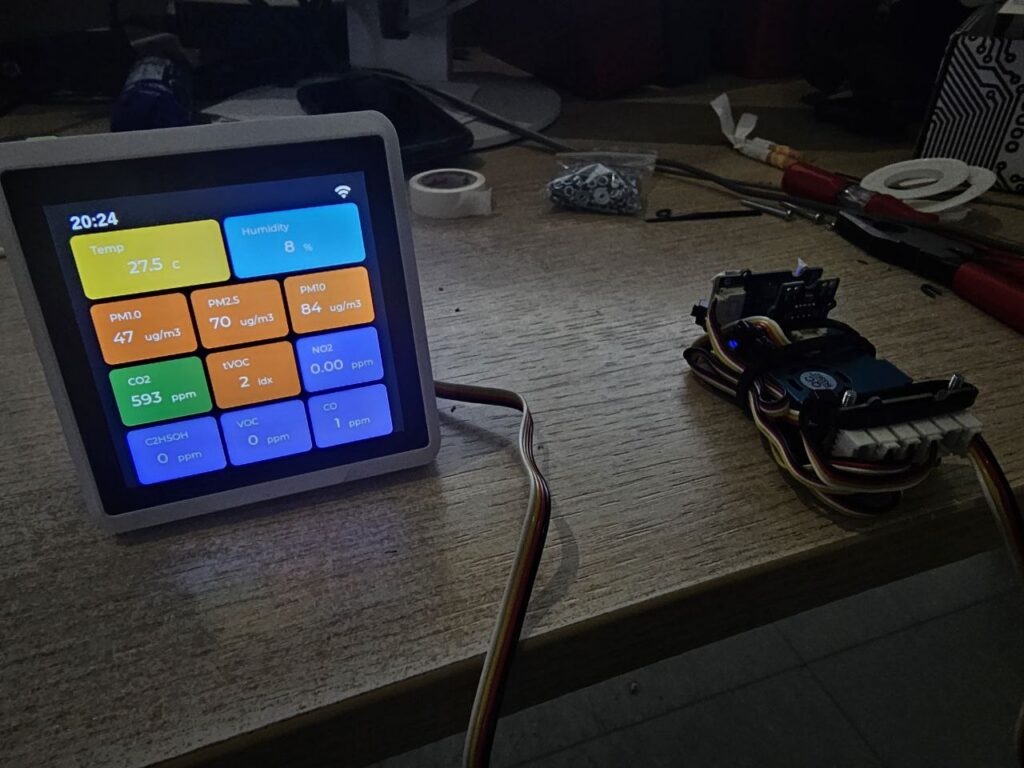
Air quality monitoring has become increasingly important, whether for home environments, offices, or industrial applications. When I discovered the SenseCAP Indicator D1S by Seeed Studio, I saw an excellent foundation for a comprehensive environmental monitoring station. However, the stock firmware only supports the built-in CO2 and TVOC sensors and an external AHT20. I wanted more.
This project extends the SenseCAP Indicator with particulate matter sensing, multi-gas detection, and database export capabilities — all programmed entirely by AI under my direction.
The Hardware
The SenseCAP Indicator D1S is a powerful IoT device featuring:
– ESP32-S3 main processor with WiFi
– RP2040 coprocessor for sensor communication
– 480×480 pixel touch display
– Grove I2C connectors for sensor expansion
– Built-in SCD41 (CO2) and SGP40 (TVOC) sensors
My Buys
To create a comprehensive air quality monitoring station, I added the following Grove sensors:
https://botland.de/grove-gas-und-staubsensoren/16907-grove-vierkanal-gassensor-seeedstudio-101020820-5904422345174.html
https://botland.de/grove-konverter-und-konverter/15856-grove-i2c-hub-splitter-6-ports-seeedstudio-103020272-5904422324872.html
The Challenge
The stock SenseCAP firmware is open source, but extending it to support additional sensors required modifications to both the ESP32 (display and logic) and RP2040 (sensor communica
tion) firmware. This includes:
1. Adding I2C communication for new sensors on the RP2040
2. Defining new packet types for sensor data transmission
3. Creating UI elements to display the new sensor data
4. Implementing a database export feature for data logging
As someone who understands the architecture and requirements but didn’t want to spend weeks coding, I decided to try something different: letting AI write all the code.
100% AI-Programmed
Here’s what makes this project unique: every single line of code was written by AI, with me providing direction, requirements, and feedback.
How It Worked
1. I described what I wanted — „Add support for the Grove HM3301 PM sensor“
2. AI analyzed the existing codebase — Understanding the packet protocol, UI structure, and sensor framework
3. AI wrote the implementation — Complete with error handling, I2C initialization, and data transmission
4. I tested on real hardware — Reporting back any issues
5. AI fixed bugs and refined — Iterating until everything worked perfectly
This workflow proved incredibly efficient. Features that might have taken me days to implement were completed in hours. The AI understood the ESP-IDF framework, LVGL graphics library, Arduino ecosystem, and even the MySQL wire protocol for database connectivity.
What AI Built
RP2040 Firmware:
– Grove HM3301 particulate matter sensor integration
– Grove Multichannel Gas Sensor V2 support
– Proper I2C device detection and error handling
– COBS-encoded packet transmission to ESP32
ESP32 Firmware:
– Sensor data reception and parsing
– Real-time display with all sensor values
– Historical data tracking (24-hour and 7-day views)
– Complete MariaDB/MySQL export functionality
– Native MySQL protocol implementation (no external libraries!)
– Professional settings UI for database configuration
– Automatic timezone detection from IP geolocation
Features
Real-Time Monitoring
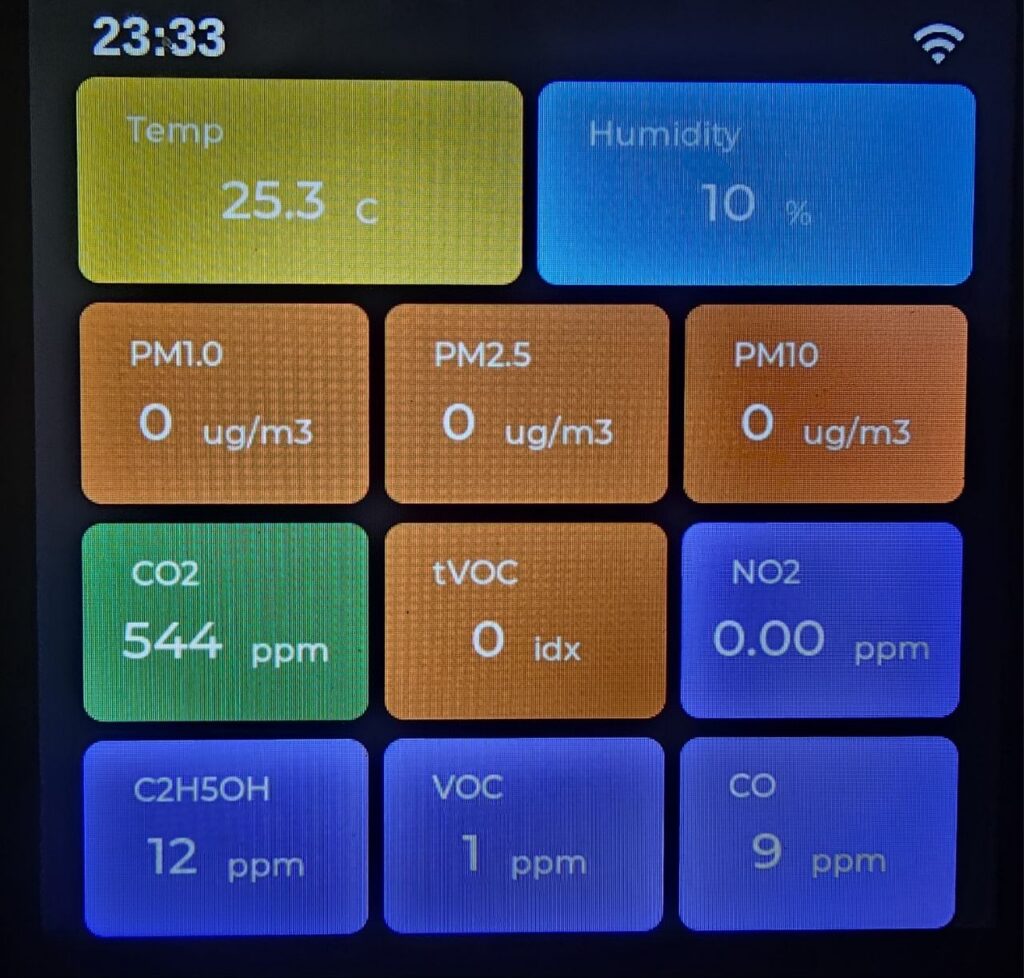
The display shows all sensor data in real-time:
– Temperature & Humidity (internal SCD41 + external AHT20)
– CO2 levels in ppm
– TVOC Index for air quality
– Particulate Matter (PM1.0, PM2.5, PM10 in µg/m³)
– Gas Sensors (NO2, Ethanol, VOC, CO qualitativ so i named it ppm(eq))
Database Export
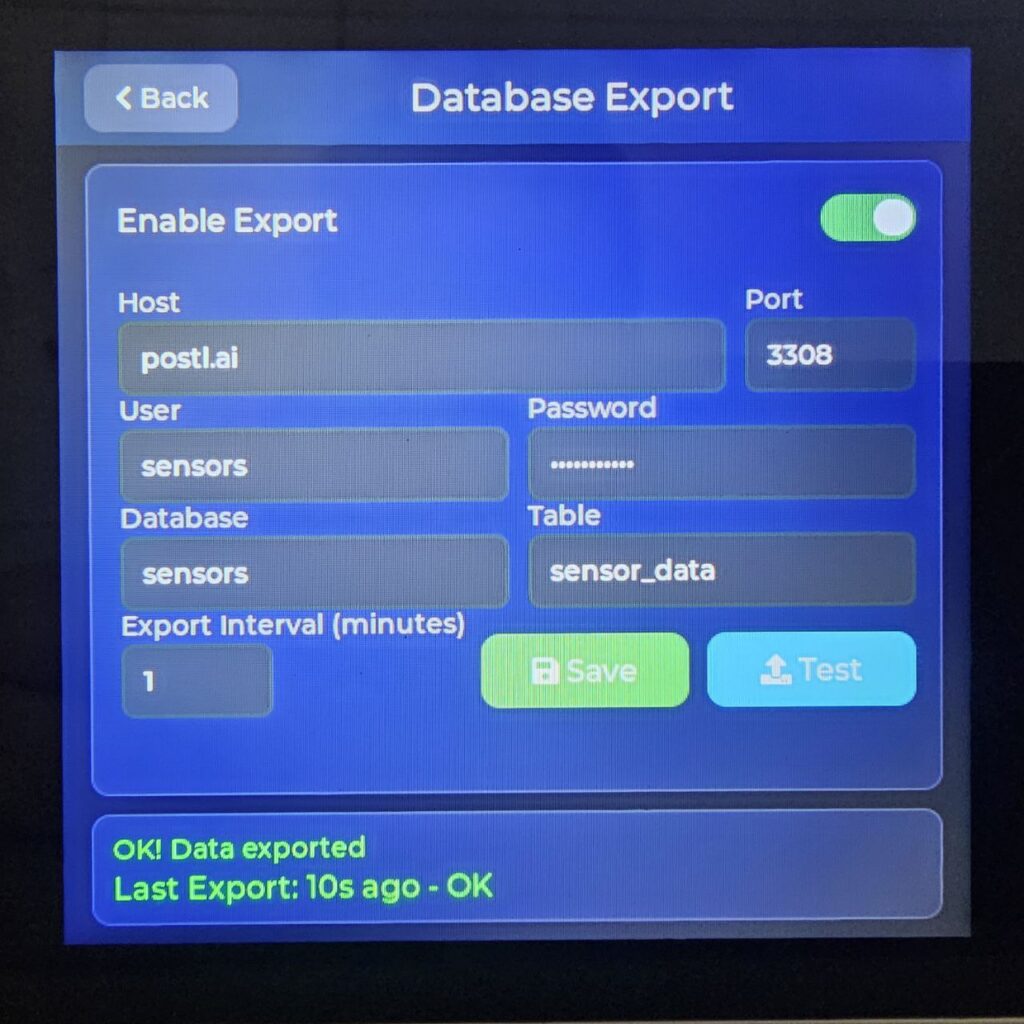
One of the most powerful features is the ability to export sensor data directly to a MariaDB or MySQL database. This enables:
– Long-term data storage and analysis
– Integration with Grafana or other visualization tools
– Custom alerting based on sensor thresholds
– Multi-device data aggregation
The firmware automatically:
– Creates the database table if it doesn’t exist
– Handles connection failures gracefully
– Shows export status with timestamp
– Supports configurable export intervals
Historical Data on Display
The device stores historical data locally:
– 24-hour view: Data points every 10 minutes
– 7-day view: Daily min/max values
This provides immediate insight into trends without needing external database access.
Technical Deep Dive
Sensor Communication
The RP2040 communicates with sensors via I2C and transmits data to the ESP32 over UART using COBS (Consistent Overhead Byte Stuffing) encoding:
„`
[Sensor] –I2C–> [RP2040] –UART/COBS–> [ESP32] –Display/WiFi–>
„`
Each sensor reading is packaged with a type identifier:
– `0xB6` = PM1.0
– `0xB7` = PM2.5
– `0xB8` = PM10
– `0xB9-0xBC` = Gas sensor channels
– etc.
MySQL Protocol
Rather than using a heavy MySQL client library, the AI implemented the native MySQL wire protocol from scratch. This includes:
– TCP connection handling
– Server handshake parsing
– `mysql_native_password` authentication (SHA1-based)
– Query execution and response parsing
– Proper packet framing
This approach keeps the firmware lean while providing full database functionality.
Source Code
The complete source code is available on GitHub:
– ESP32 Firmware: https://github.com/t0mii/SenseCAP_Indicator_ESP32
– RP2040 Firmware: https://github.com/t0mii/SenseCAP_Indicator_RP2040
Both repositories include detailed README files with build instructions.
Lessons Learned
AI as a Programming Partner
This project demonstrated that AI can be an incredibly effective programming partner when:
1. You understand the architecture — I knew what needed to happen, not the exact syntax in my mind
2. You can test and provide feedback — Real hardware testing was essential
3. You iterate quickly — Bug reports led to immediate fixes
4. You trust but verify — AI code needed testing like any other code
Limitations
AI-generated code isn’t perfect:
– Sometimes needed multiple iterations for edge cases
– Required guidance on hardware-specific quirks
– Debugging still needed human interpretation of symptoms
But overall, the productivity gain was remarkable.
The Conlusion
The SenseCAP Indicator D1S, extended with additional Grove sensors and AI-programmed firmware, has become a powerful air quality monitoring station. It tracks particulate matter, multiple gases, CO2, temperature, and humidity — all displayed on a beautiful touch screen and optionally exported to a database.
If you’re interested in building your own extended SenseCAP Indicator, check out the GitHub repositories and feel free to reach out with questions!